How to Reduce Cloud Storage Costs With Smart Multi-Cloud Uploads
How to Reduce Cloud Storage Costs With Smart Multi-Cloud Uploads
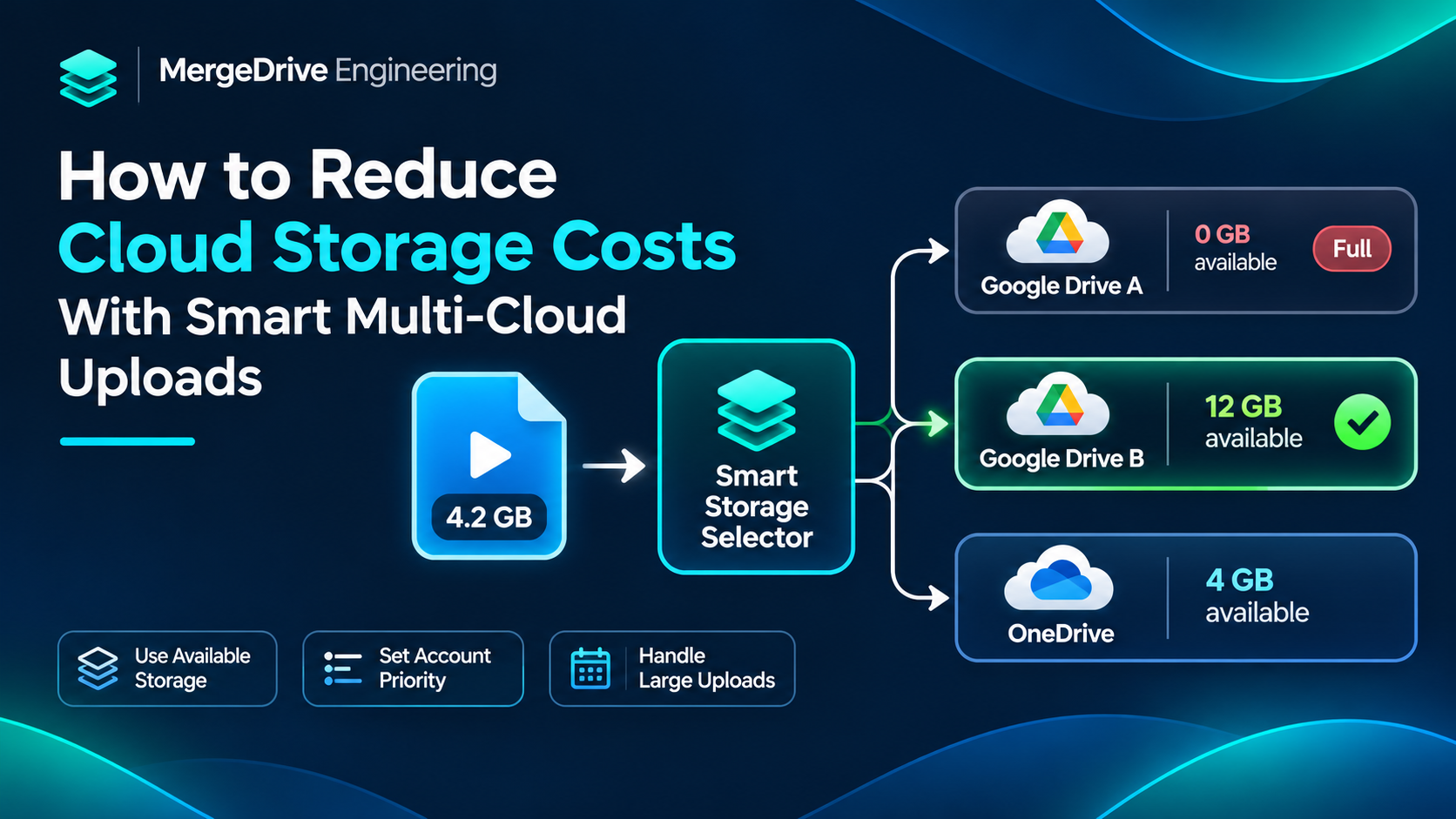
Cloud storage costs are not always caused by a genuine shortage of storage. Sometimes, they are caused by inefficient utilization of existing resources.
Imagine having three connected cloud storage accounts. Your primary Google Drive account is completely full, but your secondary Google Drive and OneDrive accounts still have unused capacity.
A traditional application might report an insufficient storage error or encourage the user to upgrade their storage plan.
A smarter application could identify another eligible account with enough available capacity.
This is one of the problems I'm addressing as the founder and developer of MergeDrive.
In this article, we'll explore how developers can reduce unnecessary cloud storage costs by designing intelligent multi-cloud upload workflows.
The Problem With Traditional Cloud Storage Management
Most cloud storage applications organize their workflows around individual accounts.
This creates several challenges:
- One account becomes full while others remain underutilized.
- Users must manually switch between accounts.
- Storage availability must be checked separately.
- Uploads can fail because of insufficient destination storage.
- Users may purchase additional capacity unnecessarily.
- Developers must maintain separate cloud storage API integrations.
A multi-cloud storage manager can address these challenges by providing a centralized view of connected storage accounts.
However, visibility alone is not enough. The application also needs to make intelligent decisions about where files should be stored.
Understanding Available Cloud Storage
Consider the following example:
| Cloud account | Total capacity | Used | Available |
|---|---|---|---|
| Google Drive A | 15 GB | 15 GB | 0 GB |
| Google Drive B | 15 GB | 3 GB | 12 GB |
| OneDrive | 5 GB | 1 GB | 4 GB |
| Total | 35 GB | 19 GB | 16 GB |
Although the primary Google Drive account is full, 16 GB of storage remains available across the other accounts.
Instead of immediately purchasing more storage, the application could help the user utilize this existing capacity.
There is an important limitation: these accounts retain their individual storage quotas.
A 14 GB file cannot fit into either remaining account individually, even though their combined available capacity is 16 GB.
A multi-cloud storage manager does not automatically turn separate accounts into a single physical storage volume.
Step 1: Retrieve Storage Quotas From Cloud APIs
Before selecting an upload destination, the application needs information about available storage.
Google Drive API
The Google Drive API provides storage quota information through the About resource.
GET https://www.googleapis.com/drive/v3/about?fields=storageQuota
An illustrative response could look like this:
{
  "storageQuota": {
    "limit": "15000000000",
    "usage": "3000000000",
    "usageInDrive": "2000000000",
    "usageInDriveTrash": "100000000"
  }
}
For standard personal Google accounts, storage usage can include services beyond Google Drive, so the overall usage field is important when calculating available capacity.
Some organizational accounts use pooled storage, and some accounts may not return a fixed quota limit.
Official documentation:
https://developers.google.com/workspace/drive/api/reference/rest/v3/about
Microsoft OneDrive API
Microsoft Graph provides quota information through the Drive resource.
GET https://graph.microsoft.com/v1.0/me/drive?$select=id,quota
An illustrative response:
{
  "id": "example-drive-id",
  "quota": {
    "total": 5000000000,
    "used": 1000000000,
    "remaining": 4000000000,
    "state": "normal"
  }
}
Both requests require appropriate OAuth authentication and permissions.
Official documentation:
https://learn.microsoft.com/en-us/graph/api/drive-get
The examples above use fictional quota values rather than live account information.
Step 2: Normalize Storage Information
Different providers return storage information in different formats.
A unified cloud storage API can normalize this information into a common data model.
type CloudProvider =
  | "google-drive"
  | "onedrive";

interface StorageAccount {
  id: string;
  provider: CloudProvider;
  availableBytes: number | null;
  reservedBytes: number;
  priority: number;
  connected: boolean;
  writable: boolean;
}
This interface allows the application to work with a consistent representation of connected accounts.
An unknown quota is represented by null rather than incorrectly assuming that the account has unlimited storage.
The application can then handle provider-specific details inside its integration layer.
Step 3: Build a Smart Storage Selection Algorithm
A storage destination selector should determine which accounts are eligible to receive a file.
A simplified implementation could look like this:
function selectStorageAccount(
  accounts: StorageAccount[],
  fileSize: number
): StorageAccount | null {

  if (
    !Number.isSafeInteger(fileSize) ||
    fileSize <= 0
  ) {
    throw new Error("Invalid file size");
  }

  return accounts
    .filter(account =>
      account.connected &&
      account.writable &&
      account.availableBytes !== null &&
      account.availableBytes -
        account.reservedBytes >= fileSize
    )
    .sort((a, b) =>
      b.priority - a.priority ||
      (
        (b.availableBytes ?? 0) -
        b.reservedBytes
      ) -
      (
        (a.availableBytes ?? 0) -
        a.reservedBytes
      )
    )[0] ?? null;
}
This example performs three basic operations:
- Excludes disconnected accounts and accounts without write access.
- Checks whether the file can fit into the available unreserved storage.
- Selects the account with the highest priority, using remaining capacity as a tie-breaker.
This is a conceptual algorithm, not MergeDrive's production implementation.
Production systems should also account for provider file size limits, stale quota information, account policies, API restrictions, and concurrent uploads.
For very large quota values, consider using a representation that preserves integer precision.
Step 4: Respect Cloud Account Priorities
Storage optimization does not necessarily mean choosing the account with the most available space.
Users may prefer different accounts for different purposes.
For example:
- Personal documents should go to a personal Google Drive account.
- Work-related files should go to an authorized business account.
- Media files should go to a designated storage account.
- Secondary copies should go to a separate eligible destination.
A well-designed storage selection system should respect user preferences and data access policies.
The correct destination is not always the largest account. It is the eligible account that best matches the user's requirements.
Files should never be silently routed between personal and business storage when doing so would violate the user's expectations or organizational policies.
Step 5: Handle Concurrent Uploads
One challenge in smart cloud storage management is that multiple uploads may compete for the same available capacity.
Suppose an account has 10 GB available.
Two separate 7 GB upload jobs check its capacity at approximately the same time.
Both jobs might initially conclude that sufficient storage is available, even though their combined size exceeds the remaining quota.
A reservation mechanism can help prevent this problem.
Available storage:       10 GB
First upload reservation: 7 GB
Unreserved storage:       3 GB

Second upload request:    7 GB
Result: Not eligible
Applications can maintain temporary storage reservations associated with active upload jobs.
In a production system, reservation creation and capacity validation should be coordinated atomically to avoid race conditions.
Reservations should be released after cancellation or failure and reconciled with actual provider usage after completion.
Because other applications may also consume the account's storage, reservations cannot guarantee that the provider will accept every upload.
Step 6: Combine Smart Storage Selection With Upload Scheduling
Storage selection becomes more useful when integrated with upload orchestration.
Consider an application handling urgent documents, large media files, scheduled backups, and routine uploads.
A combination of upload priorities and scheduling can help manage these workloads more effectively.
Useful architectural components include:
- Priority-based upload queues.
- Scheduled upload jobs.
- Resumable upload sessions.
- Destination availability checks.
- Background upload workers.
- Failure recovery mechanisms.
Storage availability should be rechecked before executing scheduled jobs because the available capacity may have changed since the job was created.
Step 7: Build a Centralized Storage Usage Monitor
A cloud storage usage monitor gives users visibility into how effectively they are utilizing connected accounts.
A useful dashboard could display:
- Total known capacity.
- Used and available storage.
- Usage by cloud provider.
- Individual account utilization.
- Pending upload reservations.
- Accounts approaching capacity.
- Accounts with unknown quota information.
This visibility helps users make informed decisions before purchasing additional storage.
Monitoring should also distinguish between a provider's storage quota and an application's API request limits.
They are separate constraints, and having available storage does not guarantee unlimited API requests.
Where MergeDrive Fits Into This Architecture
MergeDrive is a multi-cloud storage management platform built around a simple idea:
Use the free cloud storage you already have before paying for more.
Instead of managing every cloud account independently, MergeDrive brings multiple Google Drive and OneDrive accounts into one workspace.
Its capabilities address several areas discussed in this article:
| Feature | Purpose |
|---|---|
| Multiple cloud account integration | Manage connected accounts centrally |
| Smart storage selection | Utilize eligible available storage |
| Account prioritization | Respect preferred storage destinations |
| Storage monitoring | Understand available capacity |
| Priority uploads | Prioritize important file uploads |
| Scheduled uploads | Organize planned transfers |
| Resumable uploads | Improve upload recovery |
| Secondary file copies | Maintain additional copies |
| Advanced file sharing | Control collaboration permissions |
| Unified cloud storage API | Simplify supported developer integrations |
| Webhooks | Support event-driven application workflows |
For developers building SaaS applications, client portals, document management platforms, and file upload workflows, a unified cloud storage API can reduce the need to maintain separate provider integrations for supported operations.
MergeDrive also offers a free plan supporting up to three connected cloud accounts, with additional capabilities available through eligible plans.
Explore the platform:
Can Multi-Cloud Storage Management Really Reduce Costs?
It depends on the user's storage requirements.
If users already have unused capacity across connected accounts, utilizing that capacity may help them delay or avoid unnecessary storage upgrades.
However, multi-cloud management does not create additional storage, eliminate provider quotas, or guarantee cost savings.
When total usable capacity is insufficient, purchasing additional storage may still be necessary.
Developers should also consider infrastructure costs, API usage, processing overhead, and data protection requirements when evaluating the overall economics of their storage architecture.
Production Readiness Checklist
Before implementing smart multi-cloud uploads, test the following scenarios:
- Primary storage account is completely full.
- No individual account can accommodate the file.
- Multiple uploads compete for available capacity.
- Storage quota information becomes outdated.
- An account is disconnected during an upload.
- Provider rate limits are exceeded.
- A scheduled upload encounters insufficient storage.
- A storage reservation is not released after failure.
- A provider rejects an otherwise eligible upload.
These scenarios help ensure that smart storage selection remains reliable under real-world conditions.
Conclusion
Reducing cloud storage costs is not always about finding a cheaper provider.
Sometimes, it is about utilizing existing storage more intelligently.
By combining storage quota monitoring, intelligent destination selection, account prioritization, upload scheduling, and unified cloud storage APIs, developers can build more efficient storage workflows.
The goal is simple: make better use of existing resources before purchasing additional capacity.
Your clouds. One workspace.
MergeDrive: https://mergedrive.online/
References
- Google Drive API — Storage quota information
- Microsoft Graph — Drive quota resource
- Microsoft Graph — Get drive
Disclosure: I am the founder of MergeDrive. This article was drafted with AI assistance. Code examples are conceptual and do not represent verified MergeDrive production code or API contracts.
About the author
- Building smarter multi-cloud storage solutions. Integrate Google Drive and OneDrive through one unified API. Explore cloud storage, file management, automation and developer tutorials.
Comments
Join the discussionNo comments yet. Be the first to comment.